How a Vault secret becomes a Kubernetes Secret
How a Vault secret becomes a Kubernetes Secret#
A homelab deep dive. Bare-metal Kubernetes v1.36.4, Vault running inside the same cluster via the official Helm chart, and the Vault Secrets Operator (VSO) syncing secrets for GitLab runners.
Right after I upgraded my homelab cluster to Kubernetes v1.36.4, every VaultStaticSecret started logging the same error, over a thousand times:
Failed to get Vault auth login: Error making API request.
URL: PUT http://vault.hvault.svc.cluster.local:8200/v1/auth/kubernetes/login
Code: 403. Errors: * permission denied
That message tells you almost nothing. To debug it you need a clear picture of what happens between “VSO wants a secret” and “a Kubernetes Secret exists in etcd”. This post walks through that chain.
The setup#
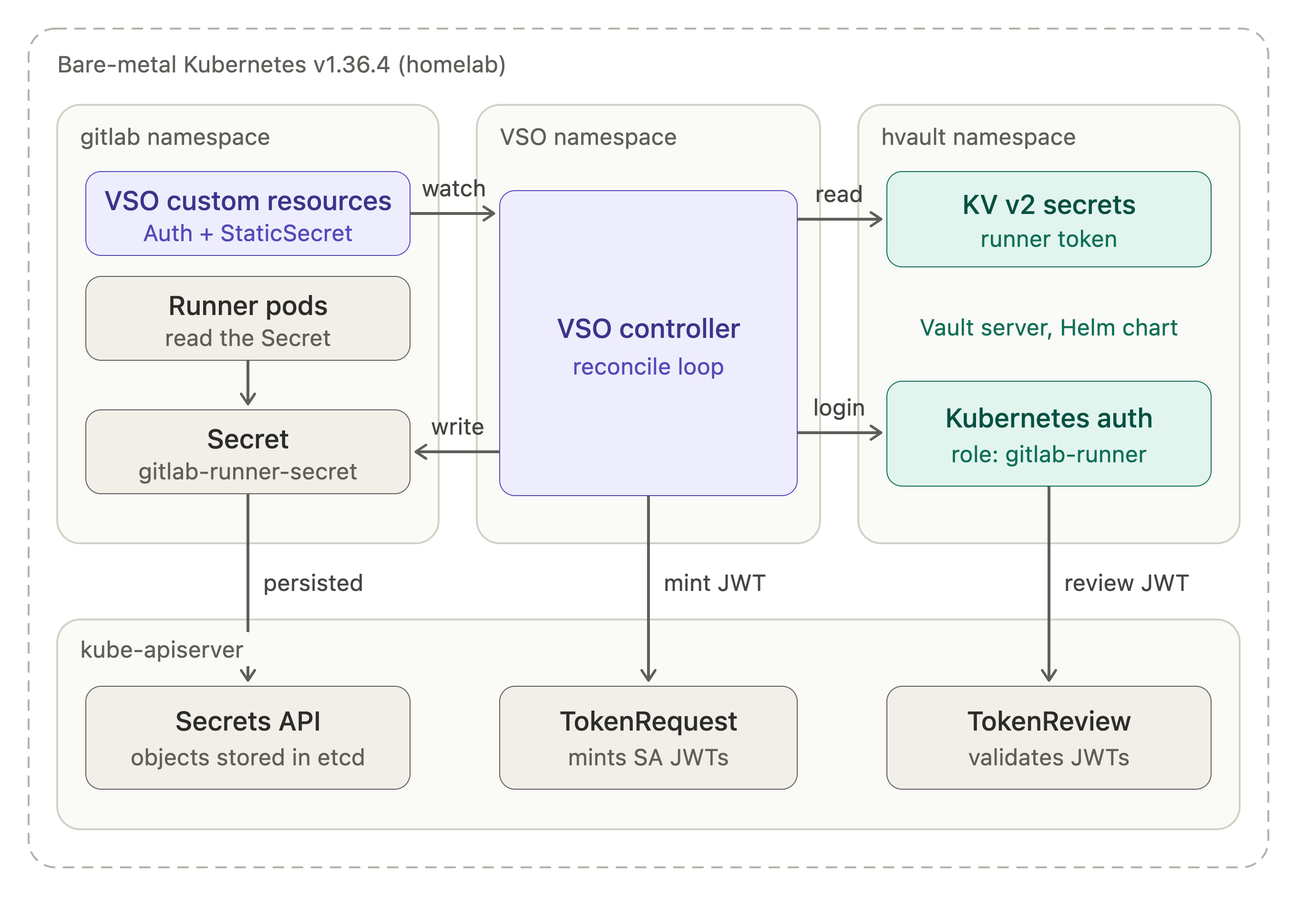
Everything runs on one bare-metal cluster:
- Vault runs in the
hvaultnamespace, installed from the Helm chart. It holds the GitLab runner token in a KV v2 engine. - VSO runs in its own namespace and watches three custom resources:
VaultConnection,VaultAuthandVaultStaticSecret. - GitLab runner pods in the
gitlabnamespace consume a plain KubernetesSecretthat VSO keeps up to date.
Two subsystems that get blurred together#
The sync looks like one feature, but it is two separate mechanisms:
- Vault’s Kubernetes auth method answers “who is calling me?”
- VSO’s sync loop answers “how does the plaintext end up in a
Secretobject?”
The 403 above comes from the first one. The second never even starts.
Phase 1: proving who VSO is#
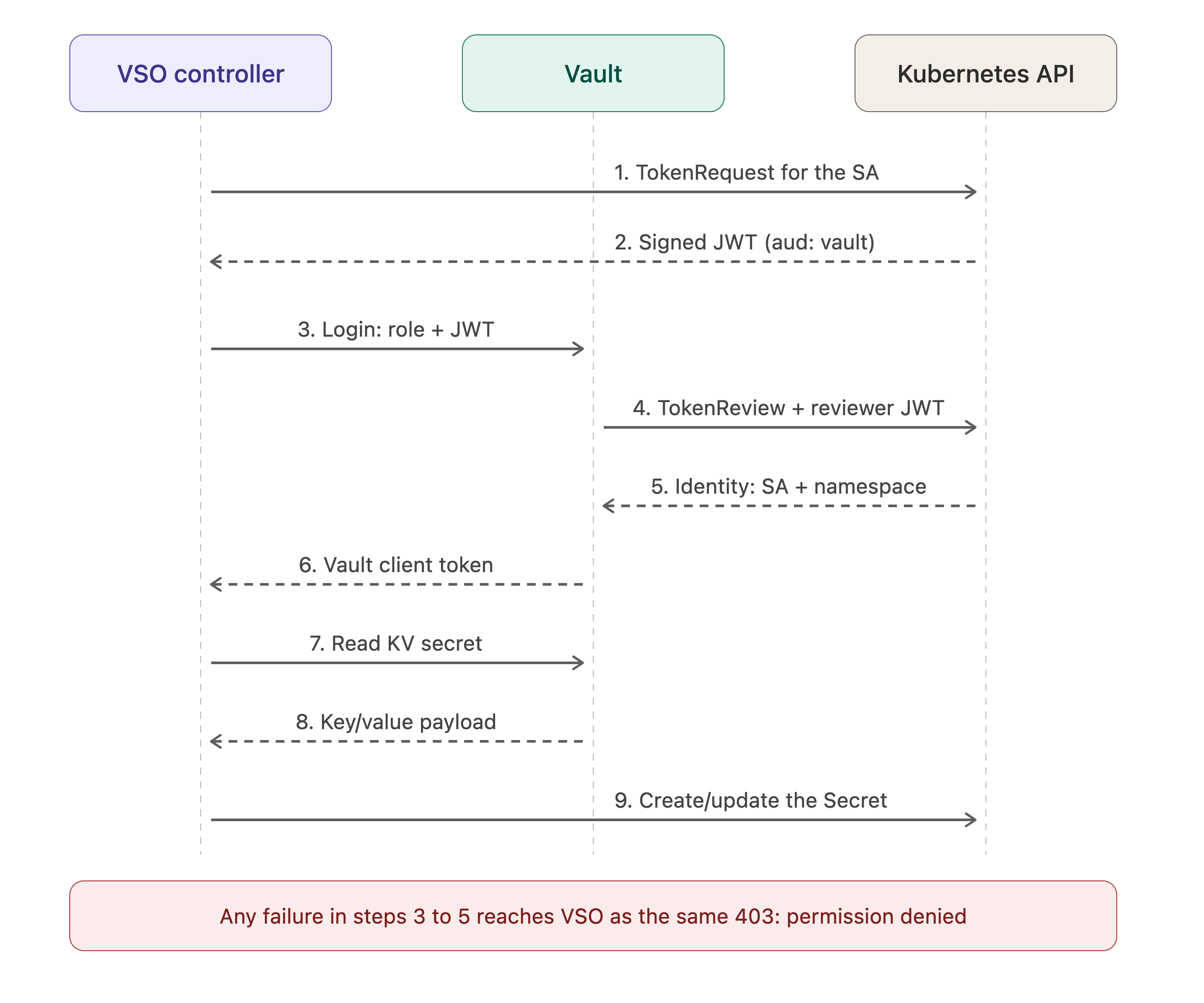
Step 1 and 2: getting a JWT. VSO doesn’t use a token mounted into its own pod. It calls the Kubernetes TokenRequest API for the ServiceAccount named in the VaultAuth resource and asks for a short-lived JWT with the audience vault. The API server signs it with the cluster’s service-account key.
apiVersion: secrets.hashicorp.com/v1beta1
kind: VaultAuth
metadata: { name: vault-auth, namespace: gitlab }
spec:
  vaultConnectionRef: default
  method: kubernetes
  mount: kubernetes
  kubernetes:
    role: gitlab-runner
    serviceAccount: vso-gitlab
    audiences: ["vault"]
Step 3: login. VSO sends the role name and the JWT to auth/kubernetes/login. Vault cannot trust the JWT yet, because it doesn’t hold the cluster’s signing key.
Step 4 and 5: TokenReview. Vault delegates verification to Kubernetes. It calls the TokenReview API, authenticating with its own reviewer credential. That is a service account token that must be allowed to create tokenreviews, which in practice means a ClusterRoleBinding to system:auth-delegator. When Vault runs in-cluster and no token_reviewer_jwt is configured, it falls back to its own pod’s token.
The API server does two checks, in this order:
- Is the reviewer allowed to ask? If not, it returns 403 or 401 before it looks at the JWT at all.
- Is the JWT valid? That covers signature, expiry, audience, and whether the ServiceAccount still exists with the same UID.
Step 6: role check and client token. Vault compares the returned identity with the role’s bound_service_account_names, bound_service_account_namespaces and audience. If they match, it mints a Vault client token with the role’s policies and returns it to VSO.
There are three distinct identities in this flow, and mixing them up is the most common source of confusion:
| Identity | Used for | Needs |
|---|---|---|
| Vault’s reviewer service account | Vault calling TokenReview | system:auth-delegator binding |
The service account in VaultAuth | The identity Vault maps to a role | To exist. No RBAC required. |
| The VSO controller’s service account | Minting tokens and writing Secrets | serviceaccounts/token create, secrets write |
Why the 403 says so little#
Vault returns a generic permission denied for every failed login: unknown role, unbound service account, issuer mismatch, audience mismatch, or a forbidden TokenReview. VSO only sees the generic answer. The real reason is in the Vault server log.
Phase 2: reading the secret and writing the Secret#
Once VSO holds a client token, the rest is simple.
Step 7 and 8: read. VSO calls GET /v1/secret/data/... with the client token. Vault checks the token’s policy against the path and returns the KV v2 payload.
Step 9: write. VSO base64-encodes each value, builds a Secret object, sets an owner reference to the VaultStaticSecret and writes it through the Kubernetes API. This uses VSO’s own RBAC, and Vault plays no part in it.
Phase 3: the refresh loop, and stale secrets#
By default VSO polls. On every refreshAfter interval it repeats the read (and logs in again if its cached Vault token is gone). That explains two things I saw:
- The error count kept climbing, because every refresh retried the failing login.
- The
Secretdidn’t disappear. VSO does not delete aSecretbecause a refresh failed, so the last synced value stays in the cluster, silently going stale.
What consumers see#
How quickly a new value reaches your workloads depends on how they consume the Secret:
- Mounted volumes are refreshed by the kubelet after a minute or so, with no restart.
- Environment variables are read once at container start, so they need a restart.
imagePullSecretsare read when a pod is scheduled, so a rotated token only affects the next pod.
A debugging cheat sheet#
Start with the Vault log, since VSO won’t tell you the cause:
kubectl -n hvault logs <vault-pod> | grep -iE "kubernetes|tokenreview|issuer|audience"
| Log message | Usual cause |
|---|---|
invalid issuer / claim "iss" is invalid | API server issuer changed, or issuer not configured |
| role not found | Role name typo in VaultAuth |
tokenreviews is forbidden / Unauthorized | Missing auth-delegator binding, or a stale token_reviewer_jwt |
x509: certificate signed by unknown authority | Configured CA no longer matches the API server |
service account name not authorized / namespace not authorized | Role bindings don’t match the VaultAuth service account |
invalid audience (aud) claim | audiences in VaultAuth differs from audience on the role |
Takeaways#
- A
permission deniedfrom VSO is a symptom. Read the Vault log to find the cause. - Keep the three identities apart: Vault’s reviewer, the
VaultAuthservice account, and the VSO controller. - After a cluster upgrade, verify the reviewer’s RBAC binding, its token, the CA and the issuer before touching anything else.
- A failed refresh leaves the old
Secretin place, so alert on VSO errors rather than trusting that the value is current.